
PRD Expectation Setting
At the beginning of the review period, the manager will set performance expectations (“Expectations”) for each reporting employee using specific Performance Factors. Prior to finalizing the Expectations, the manager will meet with each employee to discuss position outputs, duties/tasks, and explain the standards to achieve a “Meets Expectations” rating.
Performance Factors
Performance Factors, also known as “competencies,” are categories that help organize and evaluate an employee’s contributions and priorities. The following standard Performance Factors are pre-populated into PRD evaluations:
- Setting Objectives
- Organization and Work Allocation
- Leadership and Motivation
- Customer Service
- Communication Skills
- Cooperation and Teamwork
- Quality of Work
- Quantity of Work
- Job Knowledge
- Staffing (for managers)
- Performance Review and Development (for managers)
If needed for a particular position, managers can also add up to 10 supplementary Performance Factors in the Workday Expectation Setting form.
Note: Supplementary Performance Factors are separate from Workday Goals.
Manager Tips - Drafting and Presenting Expectations
STEP 1 Consider the S.M.A.R.T. Philosophy
As you proceed through these steps, keep these questions in mind:
- (S)pecific - Does the Expectation have clearly defined behaviors that illustrate a straightforward operational outcome?
- (M)easurable - Does the Expectation have a clear quantitative value to measure success and completion?
- (A)ttainable - Is the Expectation realistic, within a reasonable and manageable timeline, and challenging without being overwhelming?
- (R)elevant - Does the Expectation relate to the organizational mission?
- (T)rackable - Does the Expectation have a deadline or interim benchmark?
STEP 2: Determine Position Outputs
Set aside the Performance Factor categories for a moment and make a chart of position outputs. Outputs include the tangible results, products, services, and/or outcomes produced by a position. These items are essential for the department’s operational goals, and many of them can be found in the “Summary” section of the Workday job description. These items answer the question, “What does the position do for the department/stakeholders?” (See example below.)
| Output |
|---|
| Keeping the department updated on policy changes |
Step 3: Output | Task/Duty
After determining the essential outputs, make a second column of duties/tasks required to achieve each output. These duties are also known as the essential functions of the job. Duties and tasks must be well-defined and measurable behaviors (Workday job descriptions are usually not specific enough for this component). Tasks/duties answer the question “How does the position achieve the output?” (See the example below.)
| Output | Task/Duty |
|---|---|
| Keep the department updated on policy changes. | Draft an informational memorandum to the department after a relevant policy is changed or impacted by a law/regulation. |
Step 4: Define “Meets Expectations”
Identify the specific behaviors and measurements (“Expectations”) for completing tasks/duties at a “Meets Expectations” level. These Expectations may include specific steps to complete a duty, operational expectations, and/or measurable objectives. Expectations answer precise questions like “How?”, “When?”, “Where?”, “How well?”, “To whom?”, “To what degree?”, and “How often?” (See examples below.)
| Output | Task/Duty | Expectations |
|---|---|---|
| Keep the department updated on policy changes | Draft an informational memo to the department after a relevant policy is changed or impacted by a law/regulation. |
|
| Responsible for unit administrative oversight | Manage unit expenses and inventory within budget and timeframe constraints. |
|
| Keep unit manuals and guidelines up to date | Maintain the purchasing and requisition manual. |
|
Step 5: Consider Checklists
You may find it helpful to think of Expectations as a checklist, such as for tasks that require a particular procedure or method. (See examples below.)
| Output | Task/Duty | Expectations Checklist |
|---|---|---|
| Provide product guidance to clients at the front desk of the Golf Center. | Manage front desk student worker schedules and assignments. |
|
| Manage monthly financial administration of the Golf Center. | Perform monthly financial support activities, including expense processing and account reconciliation. |
|
Step 6: Pair Expectations with Performance Factors
Now let’s return to the Performance Factor categories listed at the beginning of this section. Look at your new column of Expectations and pair these tasks with the appropriate Performance Factors. NOTE: Some Expectations could fall under more than one Performance Factor. If this happens, you can pick the Performance Factor that you think fits best, or tailor the Expectations to fit in multiple categories. (See examples below, including examples of using similar Expectations in two Performance Categories.)
| Performance Factor | Expectations |
|---|---|
| Organization and Work Allocation | Submit student work schedules to the manager 3 weeks before the start of the workweek. Distribute workload assignments to all student workers by COB Friday before the start of the workweek. |
| Quality of Work | Ensure that policy change memos have no more than two punctuation/grammar corrections needed per page once submitted to the manager for review. |
| Communication Skills | Ensure that policy change memos are written clearly, with professional tone, and with no more than two punctuation/ grammar errors. |
Step 7: Enter the Expectations into the Manager Evaluation
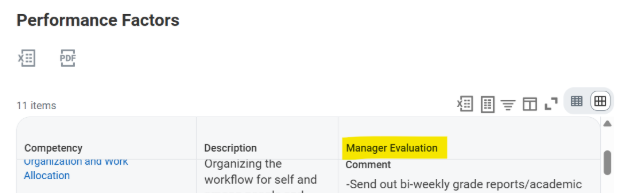
Once you have paired the Expectations with the appropriate Performance Factors, put the Expectations into the “Manager Evaluation” column of the Workday Expectation Setting form. (See image below.)
Step 8: Hold the Expectation Setting Meeting
Aim to set the meeting 1-2 weeks in advance, and consider the following agenda/talking points:
- Clearly describe the Expectations and how they relate to the position’s outputs, duties, and Performance Factors.
- Explain how to prioritize tasks during busy or peak times.
- Provide clear examples of how to achieve a “Meets Expectations” rating.
- Ask the employee to describe the Expectations in their own words to make sure they understand.
- Ask for employee input throughout the meeting, since they have in-depth knowledge of their work.
- Handle disagreements cooperatively by considering the employee’s concerns and evaluating if changes are appropriate. If the employee would like to change an Expectation but you do not agree, explain your reasoning and consider reevaluating at a future date if appropriate.
- Finalize the Workday task after you and the employee reach an understanding on all Expectations.
Important Reminders:
- Expectations for positions with the same functional job title are often very similar or the same. If appropriate, you may choose to hold group Expectation Setting meetings.
- Expectations can be amended anytime with notice to the employee. However, employee performance should not be evaluated retroactively based on a new change.
Employee Tips - Expectation Setting
- Review Draft Expectations: Review the proposed Expectations in Workday before and during the Expectation Setting meeting and write down any questions you have about them.
- Focus on Meeting Expectations: During the meeting, pay attention to the manager’s examples and description of how to achieve “Meets Expectations” in each performance area.
- Possible Discussion Points: Ask yourself these questions and share your thoughts during the meeting:
- Do I understand how success will be measured for each task?
- Do I need any additional qualifications to perform certain tasks?
- Do I understand the relevance of each task?
- Do some tasks take priority during busy/peak times?
- Do I need more examples of how to correctly complete any of these tasks?
- If I were to perform each task right now, what questions would I have?
- What task errors would be unacceptable to my manager?
- What is the right tone and terminology to use when communicating with different stakeholders?
- Do I need additional training before handling any of these tasks?
- Do I need samples of emails, reports, or memos, etc., so I can complete a written task correctly?
- If I have questions during a task, who should I ask and how?
- Do I understand the order of steps to complete each task?
- Do I have questions about a task based on an issue I had during the last PRD cycle?
- If my job includes emails, do I understand what needs to be included in each email to make the message clear (i.e., information about “who,” “what,” “where,” “when,” “why,” and “how”)?
- If my job involves multiple methods of communication (i.e., texts, phone calls, emails, etc.), do I know which form of communication to use in different situations?
- Are there particular resources (i.e., websites, guidance materials, handbooks, data systems) that I need to learn?
- Ensure Clarity/Updates: After you have discussed the draft Expectations, ask the manager if any items will be updated/clarified based on your conversation.
- Examine Areas of Disagreement: During the discussion, you may disagree with some of the Expectations. Respectfully explain your concerns and offer any proposed alternatives. If after a cooperative discussion the manager determines the Expectation should not be changed, they may agree to reevaluate it after a certain period of time. (See an example of a compromise below.)
- Employee: “The Expectations under ‘Customer Service’ include interviewing phone customers and answering in-person questions at the front desk. But it is hard for me to interview my phone customers effectively if I am also trying to answer in-person questions at the same time. Could multiple employees be assigned to answer in-person questions on a rotating basis?”
- Manager: “I understand your concerns. I can set up a rotating schedule for team members to watch the front desk on Mondays and Tuesdays. On the days when you are responsible for both tasks, you should prioritize answering in-person questions at the front desk. You can answer calls after an in-person customer leaves, or ask callers to wait on hold for a moment. I will revise this in the final Expectations in Workday.”
- Acknowledge Final Expectations: Once the Expectations are clear and the meeting is concluded, complete your Workday task acknowledging receipt of the Expectations. You can view the Expectations in Workday anytime throughout the review cycle.